Someone invited you to help
You have a link from a client or a colleague. What it gives you access to, what to do if it does not work, and what you can and cannot do once you are in.
3 min read
If a business has asked you to help with their Spark application — usually because you are the bookkeeper with the banking login, or the accountant with the incorporation paperwork — you will have an email with a link in it and, often, a one-line note about what they need from you.
What the link does
It takes you to a page that names who invited you and which business it is for, with their note if they left one.
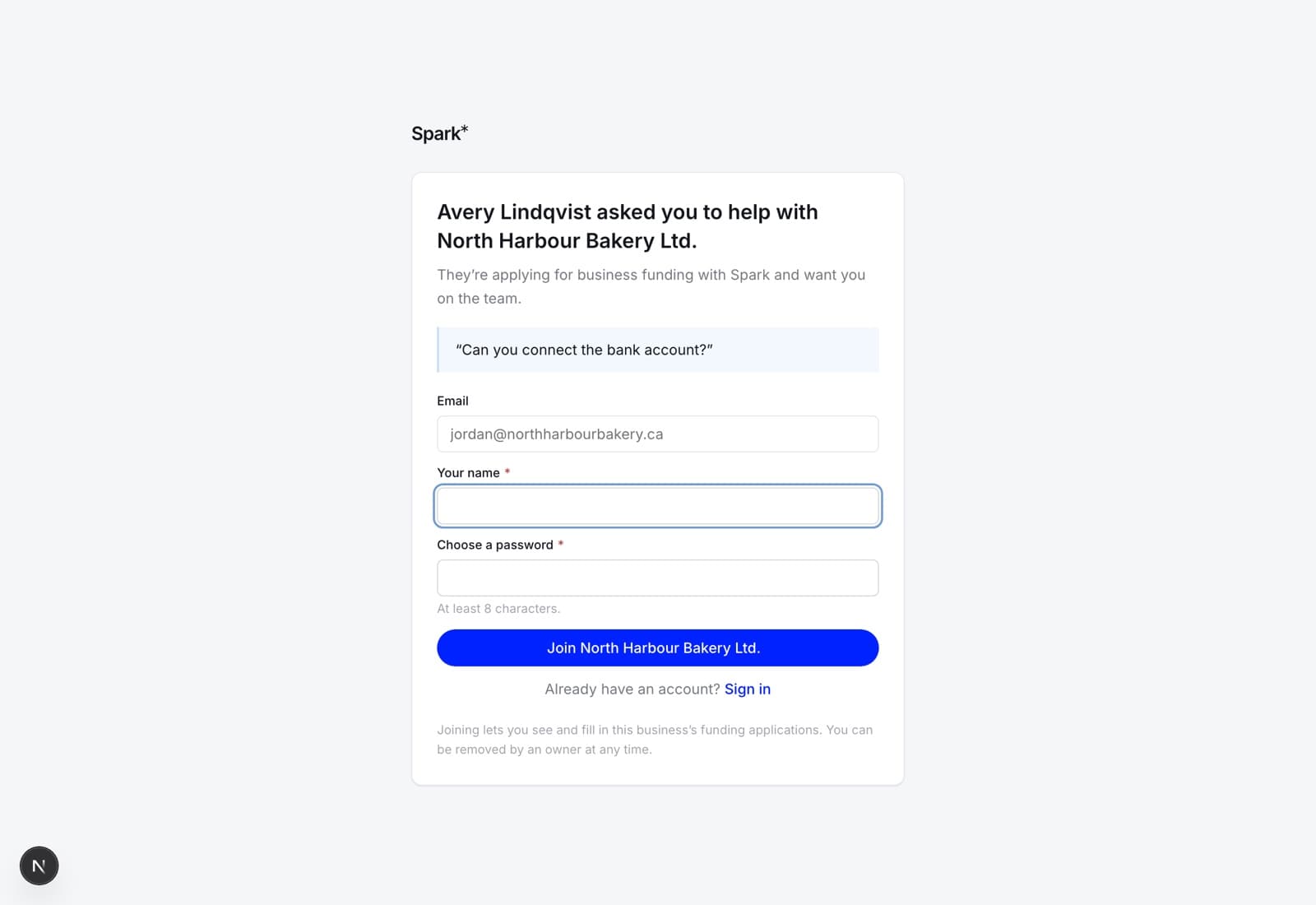
Fill in your name, choose a password — at least eight characters — and you have an account. If you already have a Spark account at that address, use Sign in underneath instead; you come back to this page and a single Join button finishes it.
If you were invited as an owner rather than as an employee, the page says so in the first paragraph: "…and want you on the team, with the ability to send the application in".
The page says what you are agreeing to in one line: joining lets you see and fill in that business's funding applications, and an owner can remove you at any time.
The email address is not editable
You are invited at a specific address and you join at that address. Forwarding the email to a colleague does not work — they would need their own invitation. If the address is wrong, ask whoever invited you to cancel it and send a new one.
If the link does not work
The page will tell you which of these it is:
- "That invitation link isn't valid." The link does not match anything we hold. Usually one that an email client broke across two lines — try copying the whole thing into the address bar.
- "That invitation has already been used." Somebody has accepted it. If that was you, just sign in.
- "That invitation was cancelled." The business withdrew it. Ask them for another.
- "That invitation has expired." They last seven days. Ask them for another; it takes them ten seconds.
- "This invitation was sent to <address>, but you're signed in as <your address>." A forwarded link is not a way into somebody else's financials. Sign out, sign in as the invited address, and follow the link again.
What you can do once you are in
Everything on the application except send it. Fill in any step, upload any document, correct anything that is wrong. The one thing reserved for an owner of the business is submitting — see owners and employees.
You will see every application that business has with Spark, in progress and finished. You will not see anything about any other business, and nobody at the business can see anything of yours.
On the web and in the app
The invitation link is deliberately a web page — the person following it usually has no app installed, and the web page handles both cases properly. Once you have an account you can use either surface, including the app, with the same email and password.
Leaving
An owner can remove you from the Team screen at any time, and you can ask them to. There is no "leave" button on your side; ask, and it takes them a moment.